Gateway Tokenization
Gateway Tokenization allows you to tokenize the payer's sensitive payment details. You can store a token and use it instead of the payment details in subsequent transaction requests sent to the Gateway. To use Gateway Tokenization, you need to first define your Tokenization service configuration, then learn how to create tokens and use them in payment transactions, and finally decide whether you want to update tokens automatically or manually.
Gateway Tokenization use cases
Gateway Tokenization is useful, for example, in the following use cases:
Using a Gateway token for a recurring billing transaction
These are the stages of using a Gateway token for a recurring billing transaction. You:
- Collect payment details from the payer and store them as a token.
- Submit the token to the Gateway as the payment instrument each time a payment is due. This is useful if you wish to reduce PCI compliance costs. For example, utility bills, gym membership.
Using a Gateway token for an online retailer
These are the stages of using a Gateway token for an online retailer.
You must:
- Collect payment details from the payer on a web site and store them as a token with the payer data.
- Present the masked account identifier or last four digits of the PAN when a payer returns to the website to make another purchase, if using the Preserve 6.4. token generation strategy and indicate that payers do not have to re-enter some or all the payment details. It improves convenience and payers' user experience when making purchases through your web site. For example, online shopping carts, online bill payment, gaming sites.
Supported methods and operations
The following table describes supported integration payment methods and operations for Gateway Tokenization.
| Integration Methods | Payment Methods | Operations |
|---|---|---|
| All | Credit and debit card | The Gateway uses tokens in the following operations:
|
Benefits of Gateway Tokenization
The Gateway Tokenization provides the following benefits:
- Reduces PCI compliance costs as you do not handle or store any payment details.
- Reduces internal fraud as your staff has limited access to payment details.
- Allows you to update payment details stored against a token. This is useful when payment details expire or change, or the payer wishes to change the payment method.
- Facilitates ease of integration of tokens into systems that currently expect card numbers. Tokens generated by the system can appear like card numbers and pass basic card validation checks.
- Allows you to retrieve payment details from a token. By default, the Gateway returns masked card numbers. If you want to manage unmasked payment details, contact your payment service provider (PSP), as it affects your PCI compliance.
- Offers different strategies for the Gateway to verify the payment details before storing them.
- Provides flexible options for token management.
Gateway Tokenization configuration
The following figure illustrates the configuration options that are available for your Tokenization service.
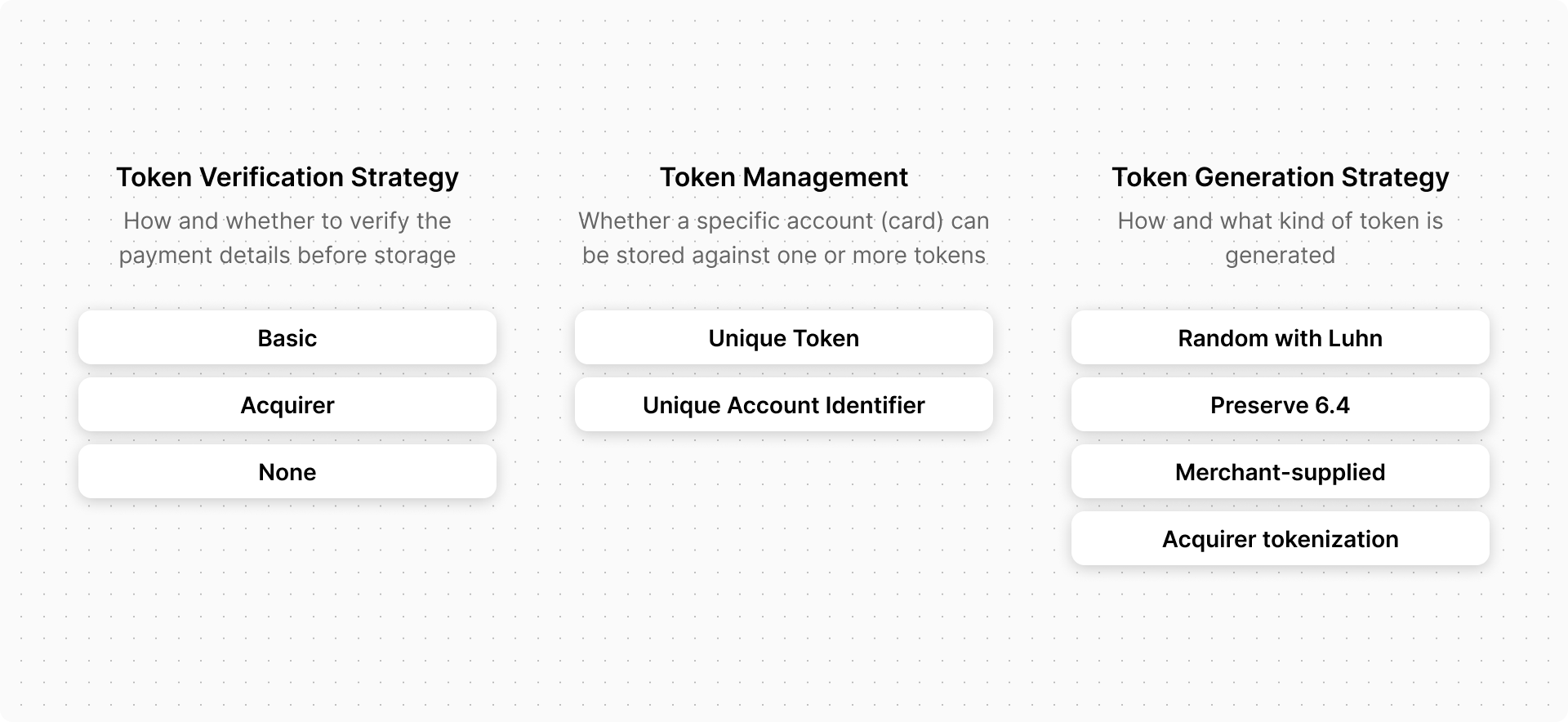
Select the options that you want and ask your PSP to configure the Tokenization service for your merchant profile:
- Token verification strategy defines how the Gateway verifies the payment details prior to being stored. The values can be:
- Basic Validates that the payment details you provide conform to the Gateway rules for processing a payment with these payment details. You do not need to provide a currency in the token creation request.:
- Acquirer Verifies the payment details by performing a VERIFY request, to verify the provided payment details with the acquirer.
Warning: When you store a token with a token creation request:For device payment transactions using DPAN, even if your token verification strategy is Acquirer, the token verification strategy automatically falls back to Basic for processing that specific transaction
- You must provide a currency.
- The transaction source defaults to the value configured for the merchant-acquirer link.
- The Enforce CSC setting for the transaction source is ignored.
- None No verification is performed.
- Token management defines how tokens within the repository are managed. The values can be:
- Unique Token Assigns a unique token every time you save an account identifier. For example, a card number. This can be defined as a one-to-many relationship between an account identifier and tokens.
- Unique Account Identifier Account identifier can only be stored against a single token. If an attempt is made to store it against another token, it results in an error. If Unique Account Identifier is used, details of a card can only be stored against one token. This can be defined as a one-to-one relationship between the account identifier and the token.
- Token generation strategy : Defines the strategy used to generate a token within the repository. The values can be:
- Random with Luhn: Generated token ID is a random number. It begins with a '9', passes a Luhn algorithm (Mod-10) check, and excludes known card numbers.
- Preserve 6.4: Attempts to preserve the first 6 and last 4 digits and is not a valid card number.
The following table describes the Account Identifier length and token digits for a token.
Account Identifier Length |
Token Digits |
|---|---|
| <=16 | 16 |
| 17 | 17 |
| 18 | 18 |
| >=19 | 19 |
The following table describes the Account Identifier length and preserved digits for a token.
Account Identifier Length |
Preserved Digits |
|---|---|
| 11 | First 5 and last 2 |
| 12 | First 5 and last 3 |
| 13 | First 6 and last 3 |
| >13 | First 6 and last 4 |
- Merchant supplied : The merchant supplies the token. The Gateway validates any token that the merchant provides is a valid card number.
Gateway Tokenization for Hosted Checkout
Prerequisites
- Ensure that your merchant profile is enabled for Hosted Payments. Please ensure both Hosted Checkout and Pay with Token and the relevant Tokenization service are enabled. If Hosted Payments and its features are not currently enabled, please reach out to your payment service provider for assistance. To activate Hosted Payments and any associated features for your merchant profile, see the Merchant Manager portal and consult the Merchant Manager User Guide for detailed instructions.
- Please ensure Secure Remote Commerce (Click to Pay) is not enabled.
- Please ensure that you follow and utilize the Credential on File integration. You can find detailed instructions and guidelines for implementing this integration over here:
- Currently,
interaction.operation=AUTHORIZEis supported for this functionality. Additional support forinteraction.operation=PURCHASEis coming soon. - WS API v74 or later must be used.
- Currently,
Token management
To view examples of the API requests and responses used in Gateway Tokenization, download the Postman collection.
You can use the following operations to manage tokens with the Gateway Tokenization solution:
- CREATE OR UPDATE TOKEN: This operation allows you to create or update a token by storing payment details against the token. The Gateway's token repository stores the token as configured on your merchant profile.
If you use the merchant-supplied token generation strategy, use the CREATE OR UPDATE TOKEN request to create a token. If your PSP configures you to use the Random with Luhn or Preserve 6.4 token generation strategy, use the CREATE OR UPDATE TOKEN with system-generated token request instead. The difference between the requests is that in the CREATE OR UPDATE TOKEN request, you provide your token ID as a path parameter, whereas in the CREATE OR UPDATE TOKEN with system-generated token request, the system-generated token is returned in the response in the token field
- RETRIEVE TOKEN: Allows you to retrieve the payment details saved against the specified token. The Gateway masks and returns the account identifier and other sensitive data. The account identifier is the card number returned on, for example, sourceOfFunds.provided.card.number.
- DELETE TOKEN: Deletes the specified token from your token repository.
- SEARCH TOKENS: Finds token records that match a query. The query currently supports search using:
- A token identifier.
- Card number.
- Card expiry.
- Last updated details.
If the query matches many token records, you can limit the search results returned per page and retrieve the next set of results using subsequent requests.
Token creation process in integration methods
The token creation process differs slightly between integration methods:
- Hosted Checkout: After the payer has completed the payment transaction on the Hosted Payment Page, use the CREATE OR UPDATE TOKEN operation to store the payment details the payer used. In the request, use the session ID received in the INITIATE CHECKOUT response
- Hosted Session: After the payer has provided their payment details in the hosted fields of your payment page and you have updated the session with those details, use the CREATE OR UPDATE TOKEN operation to store the payment details the payer used. In the request, use the session ID received in the CREATE SESSION response
- Direct Payment and Hosted Batch: Use the CREATE OR UPDATE TOKEN operation whenever you have gathered the payer's payment details and received their approval for storing them. Provide the payment details in the request.
The Gateway verifies the payment details using the default strategy that your PSP configures. However, you can override the default strategy by providing a verification method in the verificationStrategy field of the CREATE OR UPDATE TOKEN operation. If the verification is successful, the Gateway saves the payment details against a token for reference and can use them in subsequent payment transactions. You can choose to retry a CREATE OR UPDATE TOKEN operation if the first attempt does not return a response.
Token updates
You can update a token by:
- Using the automatic update feature of the Gateway, refer to Account Updater usage for token maintenance.
- Updating only specific details of the token with the CREATE OR UPDATE TOKEN operation. For example, you can update the expiry date of a card while leaving other details unchanged. The token you supply in the request URL identifies the token you want to update. If you supply the same token as a source of payment details, it causes the Gateway to reuse your previously stored details. This means you do not need to recapture the payment details. By providing the new expiry date in the card details section of the request, the value overrides the expiry date already stored in the token (see Precedence Rules ).
Update example request
The following example request shows how to update only specific details in the CREATE OR UPDATE TOKEN request by providing both the updated card details and the existing token:
| HTTP Method | PUT |
| URL | https://{{host}}/api/rest/version/100/merchant/{{merchantId}}/token/{{tokenId}} |
| Click here to download Postman Collection - the path to this operation is /Security and Fraud Prevention/Tokenization/Create Gateway Tokens/CREATE OR UPDATE merchant-supplied TOKEN | |
| JSON |
|
The JSON sample assumes that a token was previously stored and contains a card number and expiry date. The result of this operation is that the token now has an expiry date of 01/39, with the card number remaining unchanged.
Token usage in payment transactions
You can use tokens with the following payment transactions:
Create a request as usual for your selected integration method, but instead of any payment details, provide the token ID in the sourceOfFunds.token field.
Search token operation
Using the SEARCH TOKENS operation, you can search for all tokens that are updated since a specified date and time. The response provides you with all tokens, including payment details stored against the token as well as the usage information for the token, which has a usage.lastUpdated date and time after the date and time provided in the request.
You can now use your existing processes in the following ways provided in the examples:
- Update your system with the new masked card number, expiry date, or both returned in the transaction response.
- Contact payers to obtain new payment details for invalid tokens.
- Create new tokens, as required.
Replacement tokens
Refer to the Replacement tokens section in the Account Updater documentation for more information.
Testing your integration
For general details on testing your integration, see the testing instructions within each applicable integration method. To test Gateway Tokenization specifically, use your test merchant profile.
When your PSP enables and configures you for Tokenization, the Gateway creates separate token repositories for your test and production merchant profiles.
When you submit Tokenization requests to the Gateway using your test merchant profile, the Gateway uses the test token repository. To create and test payments using a token, first tokenize a supported test card number and then use the created token in a subsequent payment operation. For test card details, see Test Cards.